
AEM Cloud Service Debug Tool
Overview
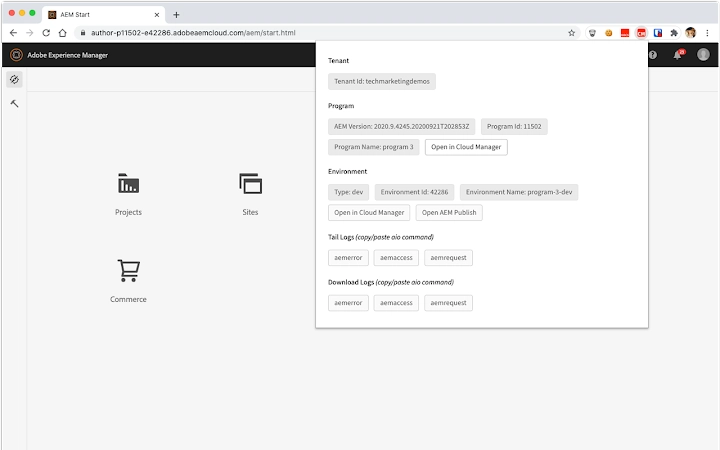
The AEM Cloud Service Debug Tool is a Chrome extension designed for developers working with AEM as a Cloud Service. Its primary purpose is to extract and display real-time information about the current tab’s AEM Author service environment, including tenant, program, and environment details. This tool simplifies debugging workflows by providing immediate access to critical environment metadata directly within the browser. It is especially useful for developers managing multiple environments, such as development, staging, and production, who need to verify context quickly without switching between tools.
The extension surfaces actionable commands for the Adobe I/O CLI, including click-to-copy options for aio cloudmanager:tail-log, aio cloudmanager:download-logs, and aio cloudmanager:environment-variables. These commands accelerate troubleshooting and deployment validation. Additionally, it supports a stripped-down version for AEM Publish services, broadening its utility across different service types. On development environments, it offers direct links to open resources in CRXDE Lite, streamlining content inspection and editing.
Target users include AEM developers, DevOps engineers, and technical leads involved in cloud-based content management workflows. The tool is particularly valuable during rapid iteration cycles, where environment verification and log access are time-sensitive. The developer, Adobe Systems Incorporated, brings established credibility in enterprise content management, reinforcing trust in the tool’s reliability and integration with Adobe’s ecosystem.
Key Features & Capabilities
- Real-time environment metadata display – Instantly shows tenant, program, and environment details for the current AEM Author service tab.
- CLI command generation – Provides one-click copy functionality for key Adobe I/O CLI commands:
aio cloudmanager:tail-log,aio cloudmanager:download-logs, andaio cloudmanager:environment-variables. - Support for AEM Publish services – A lightweight variant enables basic functionality on AEM Publish environments, extending utility beyond Author instances.
- CRXDE Lite integration – On development environments, it generates direct links to open the current resource in CRXDE Lite for immediate inspection.
- Content tree visualization – For URLs resolving to content paths, it dumps a condensed content tree (up to five levels) to aid navigation and structure validation.
These features are tailored for developers who frequently switch between environments and require rapid access to diagnostic data. For example, a developer troubleshooting a content rendering issue can instantly verify the environment and generate a log tailing command without leaving the browser. The content tree feature helps identify the correct path in complex site structures, reducing manual navigation time. The tool enhances workflow efficiency by minimizing context switching and reducing the risk of human error during command execution.
User Interface, Workflow & Performance
The user interface is minimal and focused, appearing as a compact popup within the Chrome browser. It presents key data in a clean, structured layout, prioritizing readability and quick access. Navigation is intuitive: users simply click the extension icon to view the current environment details and available commands. The workflow is streamlined—no setup or configuration is required; the tool activates automatically when navigating to an AEM Author service tab.
Performance is optimized for speed and low overhead. The extension operates in the background with minimal impact on browser responsiveness. The developer did not specify resource usage details, but based on its size (500 KB) and functionality, it is expected to consume negligible CPU and RAM during typical use. Stability is likely high, given the tool’s focused scope and the developer’s reputation. No performance bottlenecks were reported in the release notes, and the tool does not rely on external services, ensuring consistent behavior across sessions.
Compatibility & System Requirements
The AEM Cloud Service Debug Tool is compatible with Windows and Mac operating systems. It is designed as a Chrome extension, requiring the Google Chrome browser to function. The installation size is 500 KB, indicating a lightweight footprint. The software version is 1.0.0, released on April 15, 2024.
Exact system requirements were not listed. Platform compatibility information is limited to the supported OS and browser. No additional hardware specifications were provided. The tool does not require elevated permissions beyond standard browser access to the current tab’s context. It is intended for use in development and testing workflows, not for production deployment.
Pros and Cons
Pros
- Effortless access to environment metadata for AEM Author services
- One-click command copying for critical Adobe I/O CLI operations
- Support for both Author and Publish service environments
- Direct integration with CRXDE Lite for Dev environments
- Lightweight design with minimal performance impact
Cons
- Only available for Chrome browser
- Functionality limited to AEM as a Cloud Service environments
- No support for other browsers (e.g., Firefox, Edge)
- Requires manual setup of Adobe I/O CLI for command execution
- Content tree feature is limited to five levels
FAQ Section
Is the AEM Cloud Service Debug Tool free to use?
Yes, the tool is available at no cost. It is distributed as a free Chrome extension by Adobe Systems Incorporated.
Which browsers are supported?
The extension is currently compatible only with Google Chrome. No official support exists for other browsers such as Firefox, Edge, or Safari.
Do I need to install additional software to use this tool?
While the extension itself requires no installation beyond Chrome, you will need the Adobe I/O CLI installed on your local machine to execute the copied commands.
Can I use this tool on AEM Publish services?
Yes, a stripped-down version of the tool is available for AEM Publish services, providing basic functionality such as environment metadata and command generation.
Is the tool secure to use?
Yes, the tool operates within the browser’s security model and only accesses data from the current tab. It does not transmit any information to external servers. The developer is Adobe Systems Incorporated, a trusted enterprise software provider.
Final Thoughts
The AEM Cloud Service Debug Tool delivers a focused, high-value experience for developers working within Adobe’s cloud ecosystem. Its ability to surface critical environment details and generate actionable CLI commands directly from the browser significantly reduces context-switching and accelerates troubleshooting. The inclusion of CRXDE Lite integration and a lightweight content tree viewer further enhances its utility in development workflows.
While its browser and environment-specific limitations are notable, they are justified by its precise use case. For teams leveraging AEM as a Cloud Service, this tool is an essential addition to the developer toolkit. Its free availability, minimal footprint, and seamless integration with Adobe’s CLI tools make it a standout choice.
Download AEM Cloud Service Debug Tool now







